Review Comments (11) Screenshots (4) Questions & Answers (5) Votes (105) Awards (1) Wiki  
-Please log in to rate
3.7 3.7/5 (105)
-Canon Inc.
-3.1
-software.canon-europe.com
-Freeware
- 78 713 people
Download Canon MP Navigator

9.51 MBDownloaded 24569 times


Review

Canon MP Navigator is an application that enables you to work with digital photos and images. Also you can scan, copy documents. Using MP Navigator you can send image for printing, attach to e-mail or save it in PDF format.
MP Navigator is easy and handy. It is aimed for ordinary users and allows scanning photos and documents quickly and easy. You can use scanner either through graphic editor or directly from this program. Scanning directly from the graphic editor gives additional function to the scanner and allows experimenting with image settings.
The Preferences button at the bottom of the main screen leads to a pop-up window which provides settings for where the scanned file should be saved and for assigning options to the Black and Color buttons on the unit. The options of on-printer menu provides Scan to File, Scan to pdf, etc., and the file location and the type (BMP, TIFF, or JPG, with 3 quality settings for JPGs) can also be configured from here.
MP Navigator uses a similar three-step approach to the printing software: Place documents, Select Document Type, and Click Scan. Some minor adjustments can be made (the default settings are color document, Auto Detect of document size, and 300 dpi). Document type, size, and resolution can be selected.
Comparing with HP Solution Centre, MP Navigator won’t start up if you do not have compatible Canon device installed at your PC.
Advantages
  • Easy and handy in use.
  • Provides access to scanner.
  • Scanning photos and documents quickly.
  • Multifunctional (scan, edit, save).
Disadvantages
  • Not found.

Reviewed by: Julia Galygo

Reviewer rating: Editor's rating 4

Screenshots

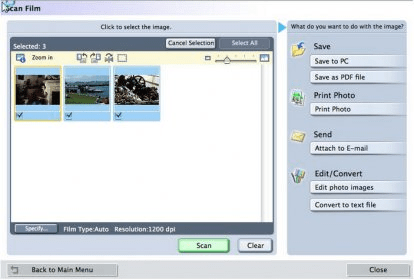
Choose option Choose option Follow the procedure Follow the procedure Scan film Scan film Scan photo, document Scan photo, document

Latest comments

Guest #6020953(beginner) 2 months ago 
Canon's webiste: This version is only for PIXMA MP140.
Bon van der Haer(beginner) 2 months ago 
Canon MP Navigator EX for Windows: the latest version
(September 5th 2009) is the version 2.03 see:
http://software-canon-europe.com/products/0010641.asp.
Guest #5464903(beginner) 3 months ago 
I am using Multifunctional inkjet Canon Pixma MX310 on vista 32 home
primuim- Hp Pavillion. I searched canon site. I think I have the latest
version for my canon PIXMA mx310. This apply to all the softwares
and drivers related to Canon Softwares installed on my computer.
P.S: See Canon Inc. website.
Add new comment All 11 comments
Download siClient

Email Address:

Password:

Register now »

Forgot password?

Copyright © 2009, Informer Technologies, Inc. About| Privacy and terms| Help| Feedback